...
Locate the line responsible for the Java options. If editing the file directly, this would typically start with CATALINA_OPTS or export CATALINA_OPTS. In the list of Java flags, you would add the below (make sure the flag before and after the one you add has proper space so it does not break the config, and as always, be sure to back up the file before even making changes.
| Code Block | ||
|---|---|---|
| ||
-Dlucee.upload.blocklist="" |
...
On a new line within the setenv.sh add the following (shown below) and make sure it is all on a single line (replace the extensions with the desired extensions you want to block):
| Code Block | ||
|---|---|---|
| ||
export LUCEE_UPLOAD_BLOCKLIST="asp,aspx,asa,asax,ascx,ashx,asmx,axd,bat,cfc,cfm,cfml,cgi,cmd,com,cshtml,dll,do,exe,htaccess,htpasswd,hta,inc,jar,json,jsp,jspx,lasso,mjs,msi,msp,php,php3,php4,php5,php7,php8,pht,phtml,phps,pl,ps1,ps1xml,ps2,ps2xml,psc1,psc2,py,pyc,pyw,rb,reg,scr,sh,shtml,vb,vbe,vbs,war,wsh,xap,xsl,xslt" |
...
You can launch the app via the Start Menu after searching for "tomcat". The name should show something similar to "Lucee-Tomcat Service Control" unless changed, as shown in screenshot below:

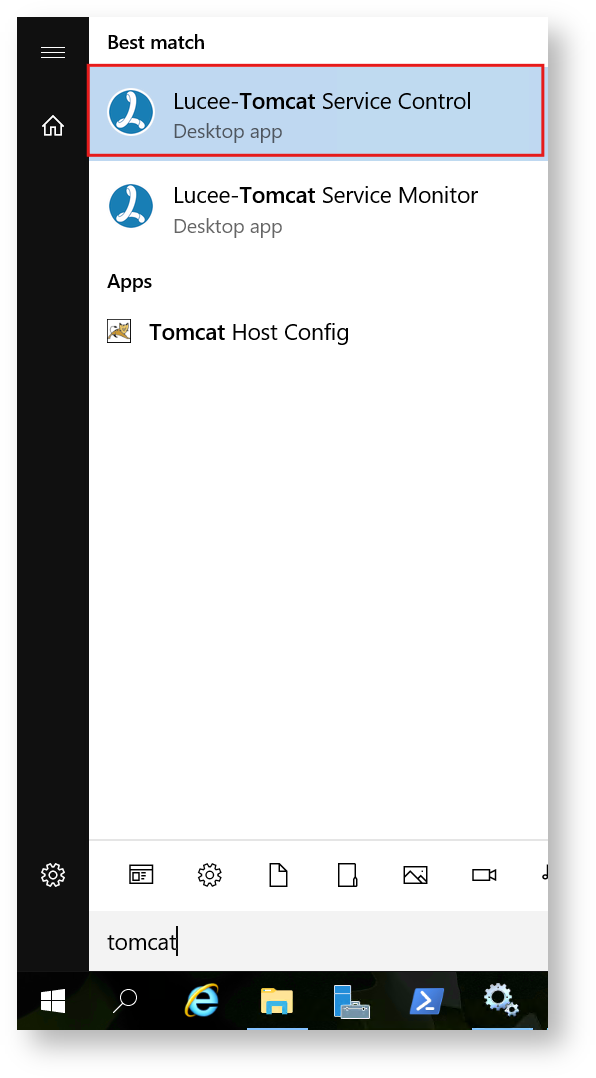
You can also launch the Lucee-Tomcat Service Control app directly from the bin tomcat/bin/ directory: C:\lucee\tomcat\bin\Luceew.exe
Once the service control app is open, click on the "Java" tab, then on a new line by itself, add the Java flag mentioned earlier with your desired extension blocklist, as shown in the screenshot below:

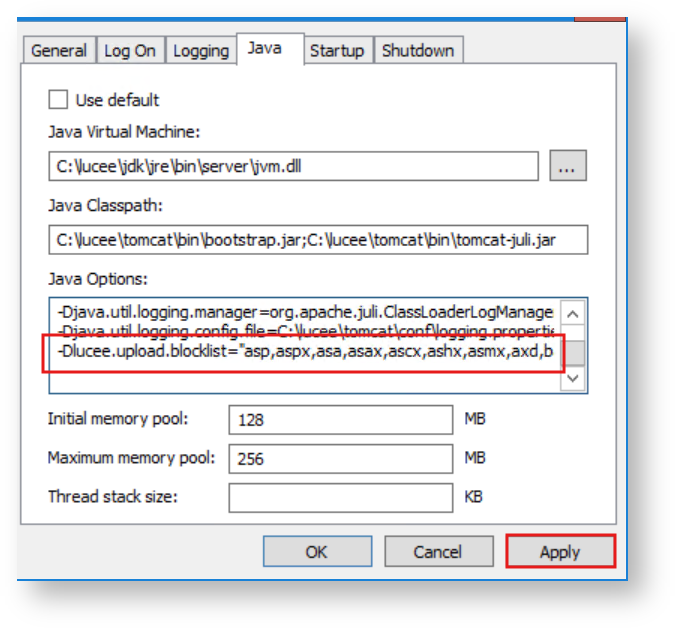
Be sure to click the "Apply" button to save your changes. Then restart the Lucee service for this new change to take effect.
...
Below is an example of implementing this in your application.cfc:
| Code Block | ||
|---|---|---|
| ||
component {
	this.name = "ExampleApplication";
	this.blockedExtForFileUpload = "asp,aspx,cfc,cfm,cfml,exe,jsp,php,sh";
} |
...
Below is an example of implementing this in your application.cfm:
| Code Block | ||||
|---|---|---|---|---|
| ||||
<cfapplication name="ExampleApplication" blockedExtForFileUpload="asp,aspx,cfc,cfm,cfml,exe,jsp,php,sh"> |
...
| Page properties | ||
|---|---|---|
| ||
|